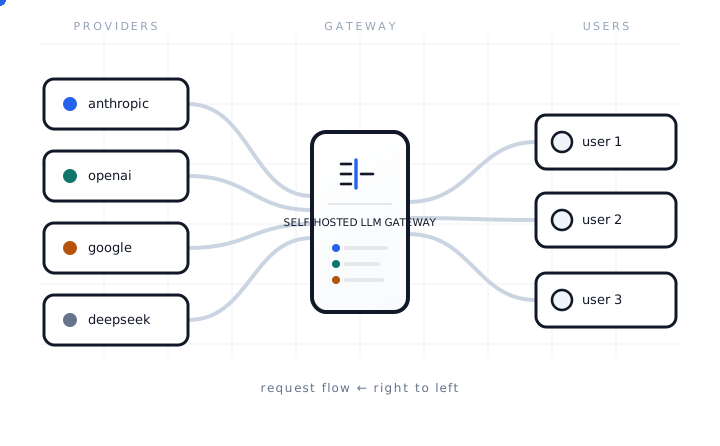
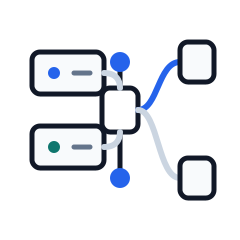
Yapp sits between engineering teams, AI agents, and model providers. It routes requests and controls spend. It connects that traffic to repositories, sessions, durable insights, and shared project memory. It runs on infrastructure you operate.
FIG. 1 — users send requests through the proxy to providers.
CONTROL PLANE SIGNALSAMPLE 7-DAY VIEW
Projects 0 normalized repositories
Requests 0K server-observed model calls
Insights 0 source-attributed entries
Cost $0 attributed across teams
01 The request path
What happens after a client uses a team key.
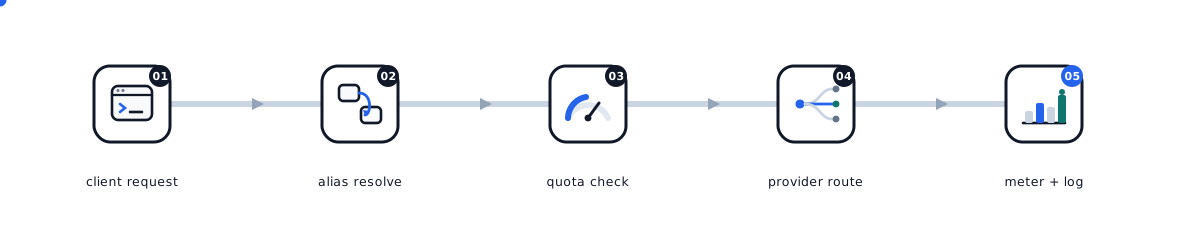
The runtime flow starts after administrators connect providers and issue user keys. The gateway authenticates, checks, rewrites, forwards, and records every data-plane request.
01
Team key
Each user receives a scoped cpk_live key from the admin panel. Provider credentials stay inside the gateway.
02
Provider endpoint
Clients call provider-shaped routes such as /openai/v1/chat/completions, /anthropic/v1/messages, or /deepseek/v1/chat/completions.
03
Route & quota
The proxy resolves the model route. It checks spend and rate guardrails. It rejects over-budget traffic before forwarding.
04
Credential injection
The gateway removes client auth. It injects the configured upstream credential. It forwards only to an allowed provider path.
05
Meter & capture
Usage, cost, latency, and optional conversation payloads are recorded for the team, user, key, provider, and model.
02 Admin panel
View spending for every team in the dashboard.
The admin dashboard shows live spend, token mix per model, and per-team budgets. Historical request payloads stay separate from lean usage rows.
localhost:3333/overviewLIVE
The real admin UI, running on sample data — click around
03 Project intelligence
Review agent work by repository.
Normalized Git remotes give each repository a stable identity. The gateway brings its sessions, accepted model requests, contributors, cost, memory, generated insights, and prompt feedback into one project view.
Repository identity converges across checkout paths and Git URL forms
Agent observations and distillation stay attributed to their source
Coverage and unavailable states are shown instead of hidden as zero
Store provider credentials at the gateway. Issue scoped team keys to callers.
agent observation · source linked Mistake
Do not infer project identity from a checkout folder. Resolve the normalized remote.
session distillation · source linked
04 Context memory
The gateway builds knowledge from real agent sessions.
The gateway turns opted-in session evidence and agent observations into project knowledge. The distiller extracts lessons. The compactor keeps the brief focused. Server-side policy controls whether agents can retrieve or receive that context.
Resolve the repository. Retrieve relevant shared context when it is enabled.
during work
Agents record observations, failures, fixes, and code pointers.
after idle
Distill mistakes into project memory. The next agent can avoid them.
05 Insight plugins
Run your own insight logic. The gateway stores the results.
The gateway is adding a plugin boundary for independently deployed, stateless gRPC insight processors. Each matching policy can run its own service. The gateway keeps canonical transcript parsing, tenant and project scope, tag governance, provenance, and durable run history.
Insight processors use a small versioned service contract.
02
Scoped configurations
Each matching global, tenant, or project policy runs independently.
03
Tag registry
Supply known tags. Choose whether processors may propose more.
04
Auditable runs
Store revisions, input hashes, results, usage, warnings, and failures.
06 Capabilities
Manage access and insight in one place.
Manage shared model access. Inspect the request path. See what agents do across repositories without joining provider dashboards and local session files by hand.
Teams
Create teams, users, scoped keys, and per-team budgets. Keep provider secrets out of app code.
Providers
Connect provider accounts from the dashboard. Built-in routes cover OpenAI, Anthropic, DeepSeek, and configured passthrough protocols.
Aliases
Use built-in model routing and manual aliases. Move callers between upstream accounts without changing clients.
Quotas
Enforce spend, token, rate, body-size, and concurrency guardrails at team, user, key, provider, or model scope.
Usage reports
Reports include request count, input and output tokens, cost, team, user, provider, model, and date.
Projects
Resolve Git remotes into stable repository identities. View the people, sessions, requests, cost, and knowledge attached to each project.
Insights
Turn agent observations and session distillation into durable decisions, lessons, mistakes, and context. Each item keeps its source attribution.
Prompt feedback
Review generated reflections on request clarity. They give concrete ways to reduce rework in future sessions.
Payloads
Review captured request and response bodies when conversation capture is enabled. Keep usage rows lean and prompts separate.
Sessions
Inspect uploaded Pi sessions. See the captured provider calls for each conversation.
Insight services
Run multiple insight policies through independently deployed gRPC processors while the gateway keeps transcript parsing, scope, tags, provenance, and run history.
Extension health
Track deployed client versions and aggregate extension failures by operation, project, conversation, and last-seen time.
Context memory
Compact repeated project lessons into curated memory. Control retrieval or injection from the server side.
07 Cost governance
Track spending and set budgets.
Set team, user, key, provider, or model policies. Spend is reserved before the upstream call and reconciled after usage is extracted.
Monthly and daily spend policies with live counters
Rate, token, body-size, and concurrency limits
Cost attributed to team, user, key, provider, and model
Monthly spend by team$80.58
Platform team$42.87
Research team$23.95
Support team$13.76
08 Usage reports
View tokens by team, model, and date.
Break down consumption by team, model, and date. Use daily or monthly granularity. Input and output token counts appear separately.
The gateway runs as a Go data-plane service, an admin API, and a static dashboard. Postgres stores configuration and history. Redis backs distributed quota and revocation checks.
# local services, then proxy + admin API + dashboard$ docker compose up -d postgres redis
$ make ui-install
$ make dev
# point a provider-compatible client at it$ export OPENAI_BASE_URL=\
http://localhost:8080/deepseek/v1
✓ data plane :8080 · admin API :8081 · UI :3333